



QuickBooks Job Estimate Reports For Construction
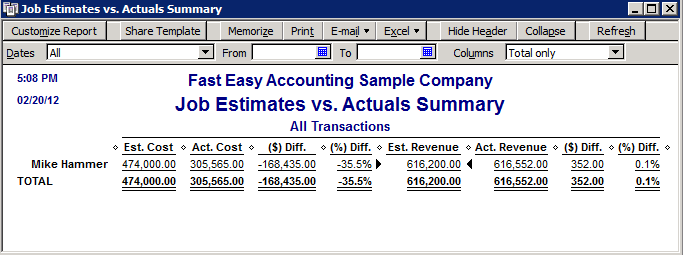
Job Estimates vs. Actuals Summary - Report shows how accurate your company is on estimating. This report summarizes estimated versus actual costs and compares estimated revenue to actual revenue for all customers that have an active estimate.


Thanks for reporting a problem. We'll attach technical data about this session to help us figure out the issue. Which of these best describes the problem?
Any other details or context?
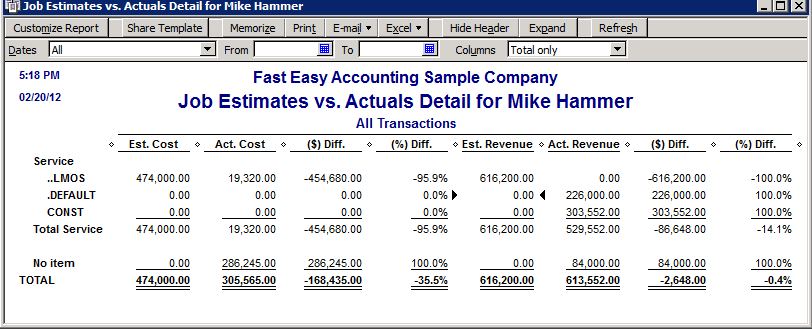
Job Estimates vs. Actuals Detail - Report offers detailed costs and revenues for the customer or job you have selected. It compares estimated and actual costs and estimated to actual revenue for each job that you Invoiced. This means you can see which parts of the job you estimated accurately and which parts you did not.
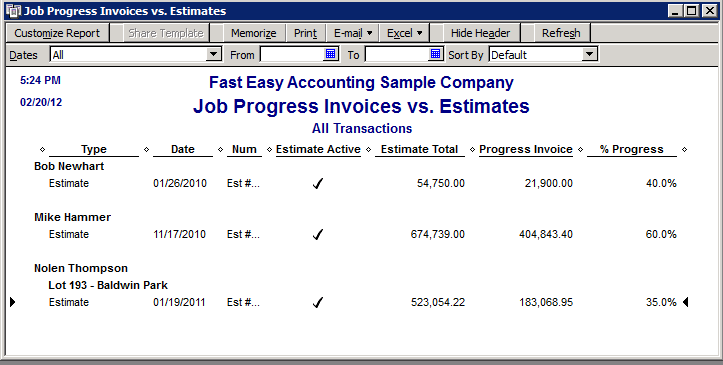
Job Progress Invoices vs. Estimates - This report compares each estimate with progress invoices based on the estimate for each job or customer. This report shows you whether or not the estimate is active, the estimate total and the total invoiced from the estimate on progress invoices, and the percentage of the estimate already invoiced on progress invoices.
Item Estimates vs. Actuals - Report shows you how close your company estimated costs and revenues for the items and construction projects. The report summarizes estimated versus actual cost and estimated versus actual revenue for all your items.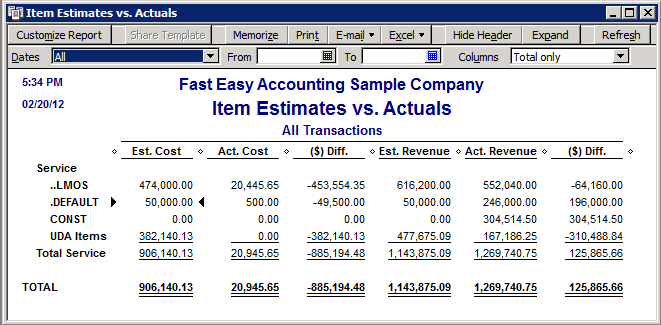
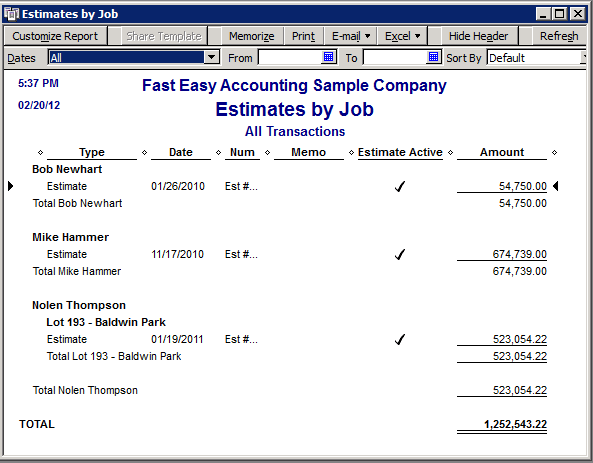
Estimates by Job - Shows all the active estimates assigned to each customer or job.
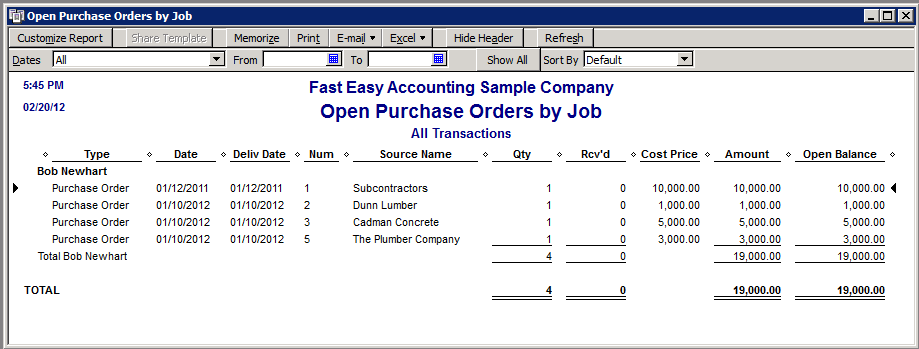
Open Purchase Orders by Job - This report shows the remaining purchase order line items that have not been received and their expected delivery date for each customer or job.
Customize QuickBooks Reports
All of the QuickBooks Reports - Shown here can be customized and then memorized them for future use. At the top of each report is a Modify Report button you can use to can change the way it looks and you can sort and subtotal the data inside it.
You Can Use Report Filtering - In order to limit the scope of the report. When selecting a filter, QuickBooks displays the fields you need to fill in.
Finally When You Have - A report customized to work for you simply memorize it for future use by clicking the Memorize button.
How To Video For Customizing QuickBooks Reports
Need A Mentor? - Someone who has been were you want to go and can guide you. We would like to be that person for you. Fill out the form on the right or call Sharie 206-361-3950 or email sharie@fasteasyaccounting.com and schedule your no charge one-hour consultation
For Construction Company Owners who do not need the full power of QuickBooks for contractors and want 24/7 online access we offer Xero Accounting Online and we have custom setup for construction companies. Click Here For More.
This Is One More Example of how Fast Easy Accounting is helping construction company owners just like you put more money in the bank to operate and grow your construction company. Construction accounting is not rocket science; it is a lot harder than that and a lot more valuable to people like you and me so stop missing out! Call Sharie 206-361-3950 or sharie@fasteasyaccounting.com and schedule your no charge one-hour consultation

Profitable Contractors and Construction Company owners have known about the value of outsourced bookkeeping services and contractor coaching services like ours for a long time and now you know about it too!
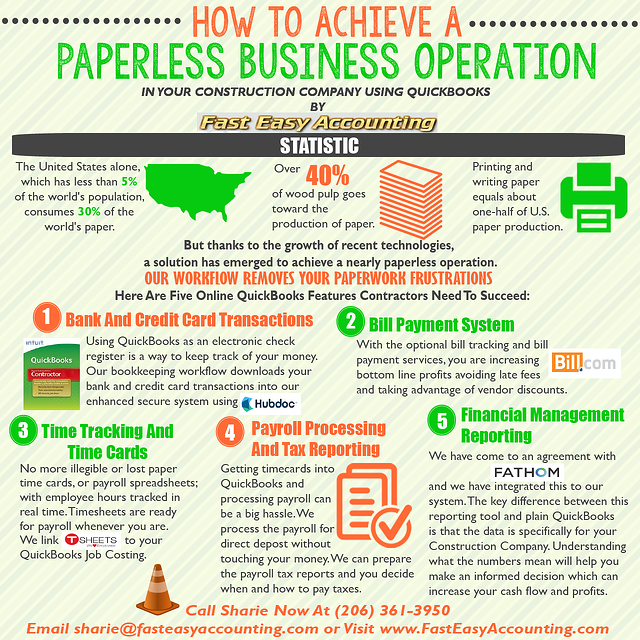
We Scan Your Receipts And Invoices link the appropriate transactions to QuickBooks or Xero Accounting Online depending on the construction accounting service you are using and provide ongoing Cloud Based Contractors Bookkeeping Services by accountants who understand construction.
Our Contractor Bookkeeping Services System Is A System
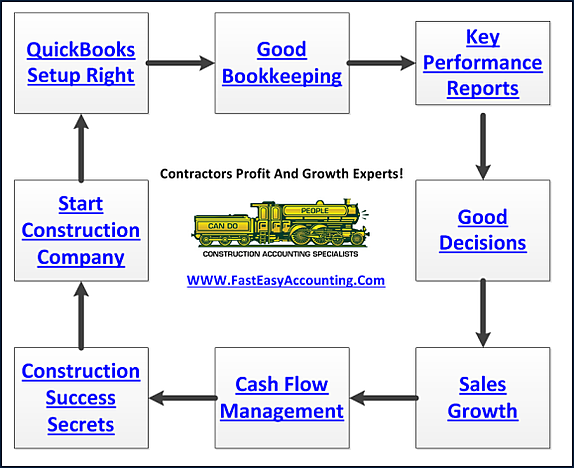
Thinking About Outsourcing Your Contractors Bookkeeping Services?
Click On The Button Below To Download A Free Guide
Business Process Management (BPM) For Contractors
Fill Out The Form And Get The Help You Need!
Need Help Now?
Call Sharie 206-361-3950
sharie@fasteasyaccounting.com
Xero Outsourced Construction Accounting Services
QuickBooks Outsourced Construction Bookkeeping Services
We Are QuickBooks Experts Specializing In Construction Bookkeeping Services

Thanks for reporting a problem. We'll attach technical data about this session to help us figure out the issue. Which of these best describes the problem?
Any other details or context?
About The Author:
 Randal DeHart, PMP, QPA is the co-founder of Business Consulting And Accounting in Lynnwood Washington. He is the leading expert in outsourced construction bookkeeping and accounting services for small construction companies across the USA. He is experienced as a Contractor, Project Management Professional, Construction Accountant, Intuit ProAdvisor, QuickBooks For Contractors Expert and Xero Accounting Specialist and Bill.Com Certified Guru. This combination of experience and skill sets provides a unique perspective which allows him to see the world through the eyes of a contractor, Project Manager, Accountant and construction accountant. This quadruple understanding is what sets him apart from other Intuit ProAdvisors and Xero accountants to the benefit of all of the construction contractors he serves across the USA. Visit http://www.fasteasyaccounting.com/randal-dehart/ to learn more.
Our Co-Founder Randal DeHart - Is a Certified PMP (Project Management Professional) with several years of construction project management experience. His expertise is construction accounting systems engineering and process development. His exhaustive study of several leading experts including the work of Dr. W. Edward Deming, Michael Gerber, Walter A. Shewhart, James Lewis and dozens of others was the foundation upon which our Construction Bookkeeping System is based and continues to evolve and improve. Check out our Contractor Success Map Podcast on iTunes and Follow Randal on Google+Follow Randal on Google+
Our Co-Founder:
 Sharie DeHart, QPA, is the President of Business Consulting And Accounting (Fast Easy Accounting) in Lynnwood, Washington. She is the leading expert in managing outsourced construction bookkeeping and accounting services companies and cash management accounting for small construction companies across the USA. She encourages Contractors and Construction Company Owners to stay current on their tax obligations. She offers insights on managing the remaining cash flow to operate and grow their construction company sales and profits so they can put more money in the bank. Call 1-800-361-1770 or sharie@fasteasyaccounting.com.