


FAQ about QuickBooks Desktop Hosting (Cloud Computing)
Isn’t there a remote access feature already built into QuickBooks?
Yes, In QuickBooks Premier Only - It has remote access feature as part of the software; however, only one user at a time may take control over one remote computer. A user must be physically present at each computer to set up a session. This is O.K. for training demos or financial presentations when speed is not important due to the lag time between pressing a key on the keyboard and waiting for the result to appear on the remote computer. Finally it is very expensive in labor cost to use it for remote bookkeeping.
QuickBooks Online does not have all the full features of QuickBooks desktop, but can't we install some web plug-ins?
Some Missing QuickBooks Desktop Features - Are available through plug-ins if you have the time, skill and desire to maintain and update them; however many of them are not available.
What is the difference between your hosting service and using QuickBooks on my desktop or notebook?
None, No Difference - Because QuickBooks is hosted on a secure server, you will be using the same version of QuickBooks no matter where you login. And in some cases since you may see an increase in performance in your local computer since all the "heavy lifting" of QuickBooks is being done on a powerful server. Learn More...
Can I Use My Mac Computer To Access Windows Based QuickBooks?
Yes! You can absolutely use your Mac Computer! There is a simple download and we have technical support available to assist you with getting it setup if you need help
What about printing and emailing from QuickBooks?
You can print and email from QuickBooks just like you are doing now. The remote server will detect whatever printer you are using on your computer now, local or network printer, and it will print to it. You can change printers inside QuickBooks remote just like you are doing now and the remote server will print there. Everything is Fast and Easy!
With your QuickBooks hosting provider, can I still get a physical copy of my files?
Yes! You can download your company file anytime to create a backup copy on your local computer. QuickBooks Online does not offer this service.
How does QuickBooks Hosting simplify my desktop computer and notebook computer maintenance?
With QuickBooks Hosting - You do not need to install or run QuickBooks on your desktop or notebook. QuickBooks, Word, Excel 2010 are all running in a web-browser and the hosting company manages all software maintenance and upgrades, automatically.
What about backing up my QuickBooks file?
The Hosting Company - Backs up the servers every night and that includes all your QuickBooks files and any Word, Excel, PDF documents you are storing in your account
Which Hosting Company does Fast Easy Accounting use?
We Use Whichever Company Best Fits Our Client's Needs:
QuickBooks Hosting Company Must Haves:
-
QuickBooks backup daily
-
Fast reliable network equipment
-
Provides English speaking tech support
-
Provides results not reasons or excuses
-
Provides superior service and tech support
-
Technical support issues are addressed promptly
-
On approved list of Authorized Commercial Host providers
Paperless Hosting Company Must Haves:
-
Paperless documents backup
-
Fast reliable network equipment
-
Provides English speaking tech support
-
Provides results not reasons or excuses
-
Provides superior service and tech support
-
Technical support issues are addressed promptly
When You Become A Client - Then we can tap into our resources of knowledge and strategy banks. We use the reports hidden in your QuickBooks in order to diagnose and understand your construction business and develop plans and help you implement a path to success for you and you alone because every contractor has unique Strengths, Weaknesses, Opportunities and Threats (S.W.O.T. Analysis) that when understood can lead to a Strategic Roadmap which cannot help but make a lot of money.
If You Are A Contractor You Deserve To Be Wealthy
Because You Bring Value To Other People's Lives!
This Is One More Example of how Fast Easy Accounting is helping construction company owners just like you put more money in the bank to operate and grow your construction company. Construction accounting is not rocket science; it is a lot harder than that and a lot more valuable to people like you and me so stop missing out! Call Sharie 206-361-3950 or sharie@fasteasyaccounting.com and schedule your no charge one-hour consultation.

Profitable Contractors and Construction Company owners have known about the value of outsourced bookkeeping services and contractor coaching services like ours for a long time and now you know about it too!
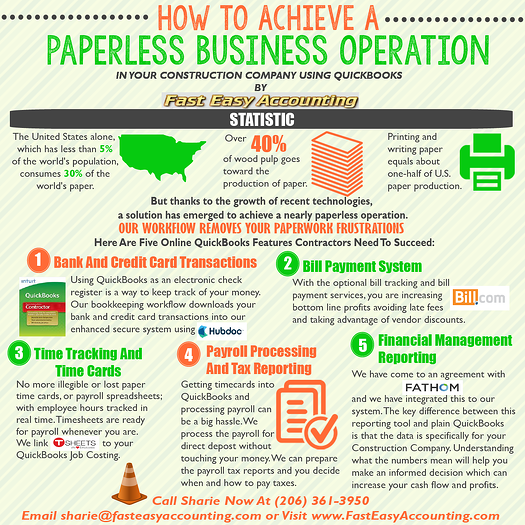
We Scan Your Receipts And Invoices link the appropriate transactions to QuickBooks or Xero Accounting Online depending on the construction accounting service you are using and provide ongoing Cloud Based Contractors Bookkeeping Services by accountants who understand construction.
Thinking About Outsourcing Your Contractors Bookkeeping Services?
Click On The Button Below To Download A Free Guide

Need Help Now?
Call Sharie 206-361-3950
sharie@fasteasyaccounting.com
Xero Outsourced Construction Accounting Services
QuickBooks Outsourced Construction Bookkeeping Services
We Are Construction Accounting Experts Specializing In Construction Bookkeeping Services For Contractors All Across The USA Including Alaska And Hawaii
About The Author:
 Randal DeHart, PMP, QPA is the co-founder of Business Consulting And Accounting in Lynnwood Washington. He is the leading expert in outsourced construction bookkeeping and accounting services for small construction companies across the USA. He is experienced as a Contractor, Project Management Professional, Construction Accountant, Intuit ProAdvisor, QuickBooks For Contractors Expert and Xero Accounting Specialist and Bill.Com Certified Guru. This combination of experience and skill sets provides a unique perspective which allows him to see the world through the eyes of a contractor, Project Manager, Accountant and construction accountant. This quadruple understanding is what sets him apart from other Intuit ProAdvisors and Xero accountants to the benefit of all of the construction contractors he serves across the USA. Visit http://www.fasteasyaccounting.com/randal-dehart/ to learn more.
Our Co-Founder Randal DeHart - Is a Certified PMP (Project Management Professional) with several years of construction project management experience. His expertise is construction accounting systems engineering and process development. His exhaustive study of several leading experts including the work of Dr. W. Edward Deming, Michael Gerber, Walter A. Shewhart, James Lewis and dozens of others was the foundation upon which our Construction Bookkeeping System is based and continues to evolve and improve. Follow Randal on Google+
Our Co-Founder:
 Sharie DeHart, QPA, is the President of Business Consulting And Accounting (Fast Easy Accounting) in Lynnwood, Washington. She is the leading expert in managing outsourced construction bookkeeping and accounting services companies and cash management accounting for small construction companies across the USA. She encourages Contractors and Construction Company Owners to stay current on their tax obligations. She offers insights on managing the remaining cash flow to operate and grow their construction company sales and profits so they can put more money in the bank. Call 206-361-3950 or sharie@fasteasyaccounting.com.