



Costs to Complete by Job Detail - Report drills down to the detailed estimated cost by phase for whatever customer or job you select and it shows you how you are doing in relation to your estimate.
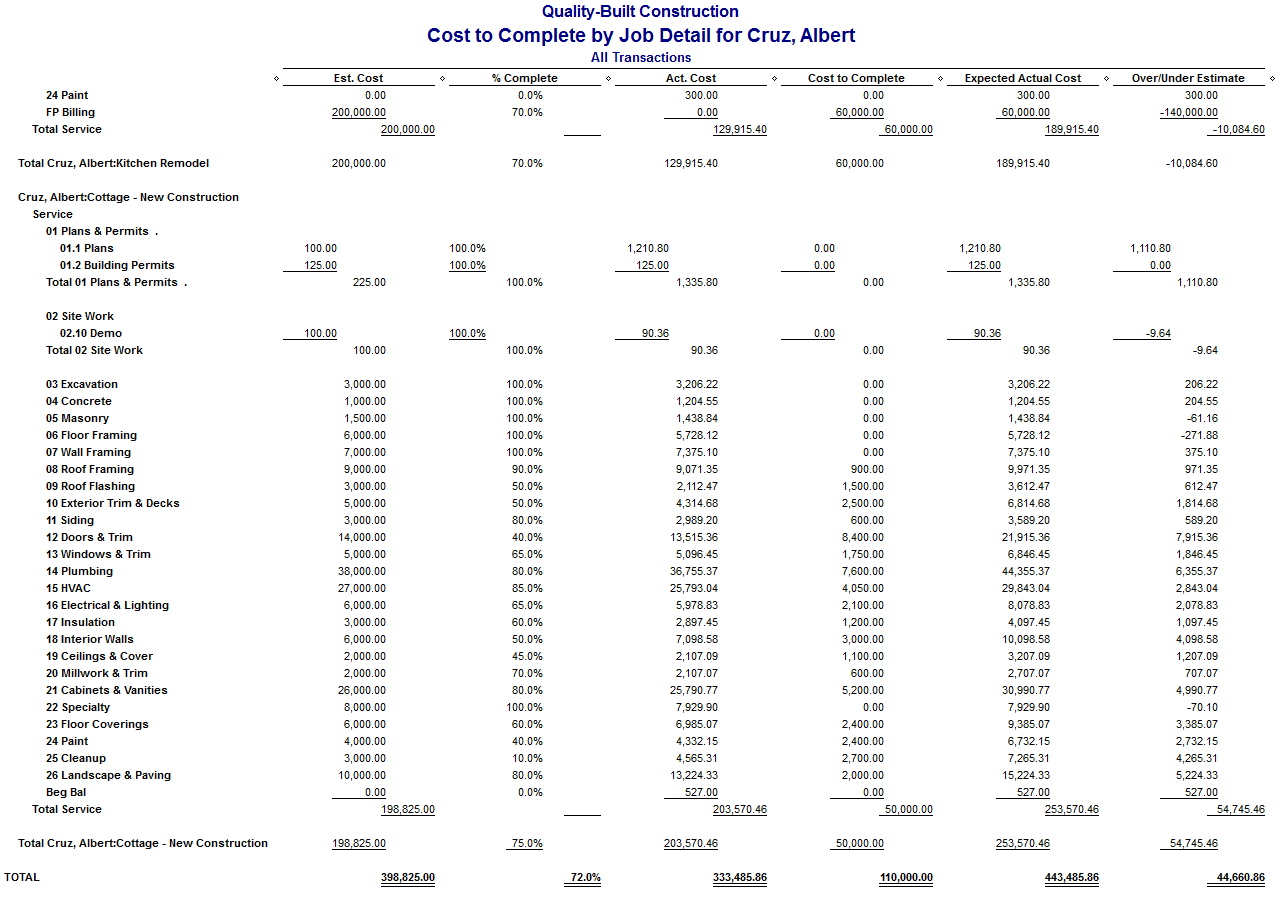
This Report Shows You - The expected cost is to complete each job listed, and you know what to do if you are over or under your estimate. We recommend running this report every day or at least weekly. If the project starts getting off track from your estimated cost you can take action before it's too late.
Each Item On The - Report shows your estimated cost, the percent complete, and actual cost to date. QuickBooks calculates and shows the estimated cost to complete each item, or work package (estimated remaining cost), expected actual cost (actual cost to date plus estimated cost to complete), and the dollar amount over or under the estimate. The item amounts are subtotaled by item type, and then totaled for each job.
QuickBooks Calculates The - Cost to complete and the expected actual cost, you need to enter a summary estimate into QuickBooks, and you need enter the amount done for each of the items that appear on that estimate.
When This Report Is Run QuickBooks - Displays the Update Item Percent Complete window, which you use to input how complete each item of the job is now. (Only items that are on the estimate will show.) Enter a percentage for each item, indicating how near the item is to completion. If you forget to enter percent complete for an item, QuickBooks will calculate the item at zero percent.
The "% Complete" column is always defined as how much of the item is done. If you change the Columns drop-down list to something other than "Total only," this column will not change.
There Is A Better Way To Run Your Construction Business And You Found It!

Click Here To Start Your Business Process Management Strategy
QuickBooks Expert Specializing In Construction Bookkeeping Services
About The Author:
 Randal DeHart, PMP, QPA is the co-founder of Business Consulting And Accounting in Lynnwood Washington. He is the leading expert in outsourced construction bookkeeping and accounting services for small construction companies across the USA. He is experienced as a Contractor, Project Management Professional, Construction Accountant, Intuit ProAdvisor and QuickBooks For Contractors Expert. This combination of experience and skillsets provides a unique perspective which allows him to see the world through the eyes of a contractor, Project Manager, Accountant and construction accountant. This quadruple understanding is what sets him apart from other Intuit ProAdvisors and accountants to the benefit of all of the construction contractors he serves across the USA. Visit http://www.fasteasyaccounting.com/randal-dehart/ to learn more.